



I have written this blog three ways: as plain Markdown files, then in Notion, and now in Obsidian. Each move came from the same itch. I wanted to write in the place where I already think, and publish from somewhere that never asks me to think about it.
What I have landed is a blog that is written in Obsidian, published by a Mac mini, assembled by three Hugo Modules and served from Cloudflare Pages. It is also the lead-in to a series called Building this blog. Each part I only touch on here gets its own deep dive, and I will tell you what is coming at the end of each section.
It has also taught me some lessons the hard way. One Saturday night, thirty-five of my published posts returned a 404 for about twenty-five minutes, because I had changed the title of a note. You will meet that one below.
If you are building anything that turns Markdown into a website, I think you will recognise at least two of the traps.
Why rebuild at all
The old damianflynn.com was already a Hugo site, with addresses like /blog/2018-11-07-book-wavemaker/. I edited Markdown directly, with a little Obsidian on the side. Then I moved my writing into Notion for a while and built notion2markdown, a converter that lives on my GitHub, to get the pages back out as Markdown. When Notion changed its price plans and its direction with AI, I decided that Obsidian was a much better fit: plain files I own, on every device.
I wanted three things. I wanted to write where I already think, which is Obsidian. I wanted the site to be a build artefact I can rebuild from scratch at any time. And I wanted the plumbing to be boring enough that adding a feature means adding a module, not rewriting a stack.
What I liked most in Obsidian was the graph and the backlinks, and Quartz, the static generator popular with digital gardens, offers exactly that. So I tried it. A quick test failed my acceptance tests, so I kept Hugo and my own theme, and built the graph and backlinks for Hugo myself, inspired by Quartz. That decision started everything below.
Authoring: a vault, not a CMS
Every piece is a folder in my Obsidian vault with an index.md and an _assets directory. The front matter is deliberately small:
yaml ShowHide 13 lines
---
title: Bicep - Tags as Parameters
description: Deploying infrastructure ARM Templates to Azure, but using Tags
  and their respective value as the parameter configuration settings
tags:
- ARM
- Azure
categories:
- Cloud
slug: bicep-tags-as-parameters
image: _assets/iac_bicep_tags-as-parameters.png
status: published
---
The important key is status. draft and ready are for me; published is the only value that ever leaves the vault. The second important key is slug, which, as you will see shortly, turned out to be the most load-bearing line in the file.
Nothing in Obsidian knows about Hugo. I write wikilinks, I paste images, I move on.
The publisher: a Mac mini and a 15-minute heartbeat
Between the vault and the site sits a publisher. It is a Python job run by a macOS LaunchAgent on a Mac mini, firing every 900 seconds. Each run does roughly this:
- Refuse to run if the vault has uncommitted changes outside the content folder, because a half-saved note must never ship.
- Select the notes that declare themselves content pieces and are not marked restricted. Their
statusdecides whether each is built as a draft or as published, and their date decides when. - Render each one into a Hugo page bundle: rewrite wikilinks to site links, copy images, write a
canonical_url. - Commit the result to a separate content repository,
DamianFlynn/garden, and push it. - Write a receipt: what was selected, what was pushed, what was refused, and why.
That receipt is the real feature. A scheduled job that fails silently is worse than no job. The publisher’s rule is that every refusal has a name, such as garden-slug-collision or unsafe-piece-path-or-slug, and I read the receipt before I believe a push happened.
The selection rules matter too. The vault holds client notes, planning documents and half-formed thoughts. A note is only considered if it declares itself a content piece, a note marked restricted is refused outright, and talks and pages are further limited to a single folder. The design assumption is that the publisher is the only thing allowed to write to the public repo, so it has to be paranoid.
Deep dive coming: how the publisher decides what may leave the vault, and the guard rails around it.
Three layers of Hugo Modules
Here is the part that made the rest tractable. The site is three repositories, glued by Hugo Modules:
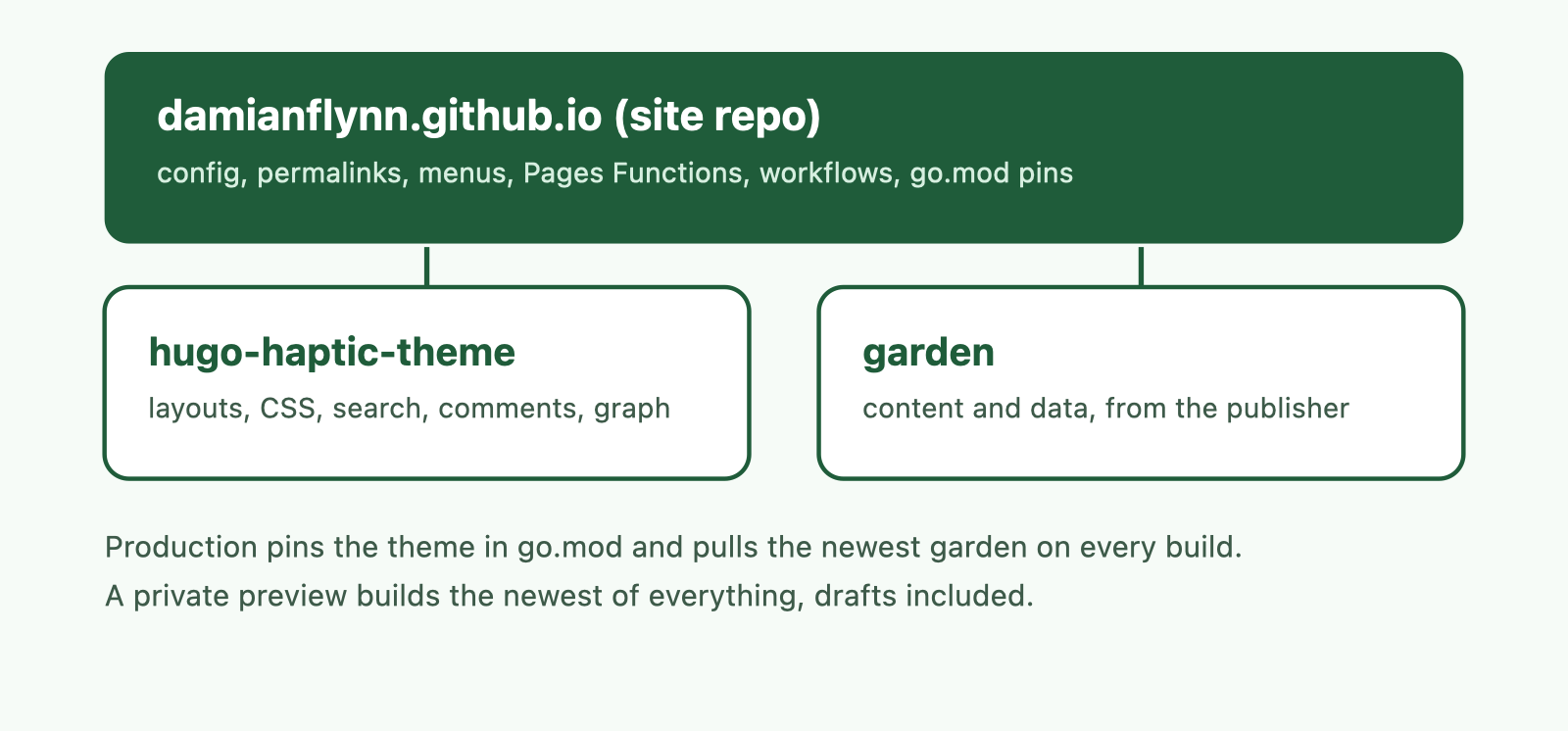
hugo-haptic-themeis the theme: layouts, CSS and the browser-side scripts.gardenis the content: posts, taxonomy pages and data, written only by the publisher.damianflynn.github.iois the site: configuration, permalinks, menus, Cloudflare Functions and the workflows. The name is a leftover from its GitHub Pages years, and I have not had the heart to rename it.
The site’s config.toml imports the other two, mounting the garden’s content, data and static folders into the site:
toml ShowHide 15 lines
[module]

    path = "github.com/DamianFlynn/hugo-haptic-theme"


    path = "github.com/DamianFlynn/garden"

      source = "content"
      target = "content"

      source = "data"
      target = "data"

      source = "static"
      target = "static"
The versions live in go.mod, and this is where it gets interesting. The theme is a private repository and the content repository is public, so the workflow sets GOPRIVATE and gives git a token for the theme. The production workflow then runs hugo mod get -u for the garden only, so it always takes the newest content but keeps the theme at the commit pinned in go.mod. A private preview workflow updates everything, so it shows the theme’s main branch the moment a theme change merges.
That split is the whole release process. A theme change is visible in preview the same hour. It reaches production only when I merge a one-line pin bump in the site repo. Content, on the other hand, flows straight through, because the publisher pushes to the garden and fires a repository_dispatch event that wakes the site’s build.
The honest cost is that “the preview looks right” proves nothing about production. More than once I have had to build locally against the pin to find out what readers actually see.
The pipeline, end to end
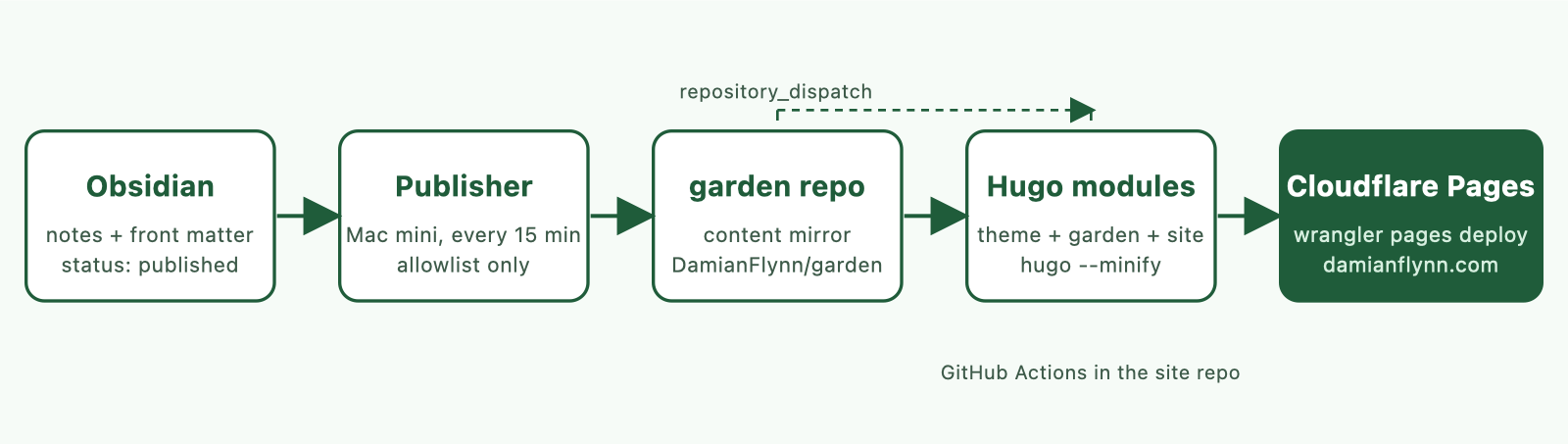
On the site side, the production workflow is plain GitHub Actions:
yaml ShowHide 11 lines
- uses: peaceiris/actions-hugo@v3
  with:
    hugo-version: '0.154.2'
    extended: true

- run: hugo mod get -u github.com/DamianFlynn/garden
- run: hugo --minify --gc --ignoreCache
  env:
    HUGO_ENV: production
    HUGO_PARAMS_RYBBIT_PROXY: /pulse
- run: wrangler pages deploy public --project-name=damianflynn --branch=main
It triggers on a push, on the garden’s dispatch event, on a nightly schedule as a safety net, and by hand. Pin the Hugo version and insist on the extended build. Mine failed in confusing ways when a machine had a newer, non-extended Hugo on its path.
Deep dive coming: the full workflow, the module cache traps with private repositories, and why
hugo mod get -uwith no module named is a loaded gun.
Taxonomy: 71 pieces, one afternoon of arguments
Once the pipeline worked, the content looked like what it was: seven years of posts with tags that had grown wild. I wrote a mapping and applied it to 71 pieces: 10 categories, 104 tags and 4 series. I decided to keep single-use tags, because tags will become links between posts and more links is better. Protocols such as C-Bus stay tags, languages are tags, and Smart Home and IoT and Edge both survive.
It was applied by a tool, not by hand, with a dry run first that had to match all 71 pieces exactly, a receipt for the run, and one vault commit I could revert. Three posts were set to draft by hand.
I also reviewed the titles of 63 pieces. A lot of old titles were labels (Bicep - Tags as Parameters), and I wanted headlines. That decision is the one that caused the outage.
War story one: 35 URLs and a retitle
Here is the sequence. I approved the new titles and applied them to the vault. The publisher ran at 23:27 UTC. Thirty-five post addresses changed.
The reason is one line of site configuration:
toml ShowHide 4 lines
# before
posts = ":sections/:title"
# after
posts = ":sections/:slug"
Hugo built post addresses from the title. Change the title, change the URL, 404 the old one. And the publisher computed internal links and canonical URLs from the same urlized title, so everything was consistently wrong.
The receipt showed it straight away, which is the upside of reading receipts. The fix was three changes: the permalink switch above, a publisher change so body links and canonical_url follow the vault slug, and a stale test fixed. The site recovered after about twenty-five minutes.
I also learnt two smaller things on the way:
- A slug may contain only
a-z,0-9and-. The publisher rejects anything else, and a slug with a dot (an old 802.1x post) fails the whole run, not just that one piece. - The vault
aliaseskey is not carried into the garden, so an alias does not keep an old address alive. If you want an old URL to survive, it needs a real redirect in the site repo.
The rule I now follow before any change that can move an address (titles, slugs, permalinks):
- Snapshot
sitemap.xml. - Land the site and publisher change first.
- Then change the vault.
- Diff the sitemap afterwards.
Since then a retitle is boring, which is exactly what you want from a retitle.
Feeds, links and the stuff readers never see
With addresses stable, I spent a stretch on the surfaces readers do not look at.
Feeds. Every item now carries the full post text, and every link back to the site is tagged ?utm_source=rss&utm_medium=feed, so a visit from a feed reader is attributable. Feed readers run no JavaScript, so counting them needed something else. That is part of the telemetry story below.
Backlinks, graph and hover previews. Because the vault is full of wikilinks, the site can show who links to a post, a small force-directed graph, and a preview when you hover a link. The graph is dependency-free SVG, and the HTML directory of links is the source of truth, so the graph is a progressive enhancement. If scripts fail, you still get the list.
Events. My conference talks are now first-class content. The main navigation says Events, with the delivery of each talk living on its own page and following the vault slug rather than the title.
None of these is difficult on its own. The point is that all of them are theme or site changes, which means they ship through the pin in go.mod and never touch the publisher.
Four features, four deep dives
I will not squeeze these into one post, so here are the teasers.
Comments with no database
Conversation happens on the networks where people already are, so this site has no comment database, no login and no cookies. When I announce a post on X, LinkedIn or Bluesky, the site notices the announcement by itself, copies the replies into the page when it is built, and puts a link on every reply to answer on the network. Your browser never talks to those networks while you read. The first version fetched Bluesky replies from the browser, and the one running today is a Zernio webhook, a GitHub Action and static data. Coming next: comments without a comment system.
Search in the browser
Search is a JSON index that the build emits and a small script that fetches it once and queries it locally with Fuse. No server sees your keystrokes. But I do want to know what people look for and cannot find, so when you stop typing for about a second, the settled query and its result count are counted as an analytics event. No identifier is attached. Coming: search that learns without watching.
Telemetry that respects you
I run a self-hosted Rybbit instance for analytics. The browser never talks to it directly: the site exposes a first-party /pulse path served by a Cloudflare Pages Function that forwards only an explicit allowlist of public endpoints and strips cookies and authorisation headers on the way. Everything else answers 404, so it is not an open proxy. The same Function counts feed readers, using the reader name in the user agent and a tiny end-of-item image. It is cookieless, which is why this site has no consent pop-up for analytics, and the privacy page explains every data flow in plain words. Coming: analytics you can explain to your readers.
GitHub Pages versus Cloudflare Pages
For a long time the site was served from GitHub Pages, with a separate preview on Cloudflare. I have now consolidated on Cloudflare Pages for both: one platform, one account, and Functions for the things a static host cannot do. There is a live site, and a private preview site where drafts and future-dated posts are built so I can read them before anyone else does. Coming: why I moved, what I gave up, and how the two sites differ.
War story two: the DNS flip that did not flip
The cutover itself happened on 22 November. I attached the domain to the Pages project, switched the records, and the site kept serving the old content.
My first instinct was DNS propagation. It was not. I checked what the host actually returned, and the response headers still carried the signature of the old origin. Two legacy rules in the zone were intercepting the traffic before DNS even mattered: a Worker route and a Page Rule that still claimed the apex. The API tokens I had could edit Pages and DNS records, but not zone rules, so I had to hand the job back to the dashboard. Once both rules were deleted, the new site answered.
What I took away: a hostname rule beats a DNS change. Test what a host really serves, using headers from the old origin as the tell, before you believe a DNS flip worked. And never ship a redirect that your zone’s own rules can loop with. A small Pages middleware now sends www to the apex with a 301, and a static/_redirects file keeps the old /blog/<date>-<name>/ addresses alive. All 147 earlier production addresses now answer with a 200 or a 301.
What I would tell you to steal
- Separate the writer from the server. One narrow publisher, with a receipt for every run, is the only thing allowed to write the public repo.
- Pin what must be stable, float what should be fresh. Pin the theme in production, float the content, and float everything in a private preview.
- Let the address come from a field that never changes. A
slugis an identity. A title is a presentation. - Order matters. Site and publisher first, vault second, diff the sitemap third.
- Test what a host serves, not what you configured. Headers beat assumptions.
- Privacy is a design constraint, not a footer. If you cannot explain a data flow in one sentence, you should not have built it.
- Make every failure refuse with a name. The two outages above cost me minutes, not days, because the failures were loud and specific.
What is next
This post is the map. Over the next weeks I will walk through comments, search, telemetry and the move to Cloudflare Pages, with the real code. I will also write up the backlinks and the graph, how I count RSS readers who never run JavaScript, how the three Hugo Modules are pinned and floated, and the publisher itself, because a safe publisher is the unglamorous heart of this whole setup.
Subscribe by RSS, and notice that when you do, I will know you opened this. Not who you are. Just that a reader did.





The full post, with the code and the mistakes: https://t.co/tAYSSj4gUR
View on X (Damian F.'s comment)